Prerequisites#
Before you dive in, you should have:
- A running Kubernetes cluster and basic tooling
- Working knowledge of Git and CI/CD
- Optional but helpful: GitFlow
GitOps#
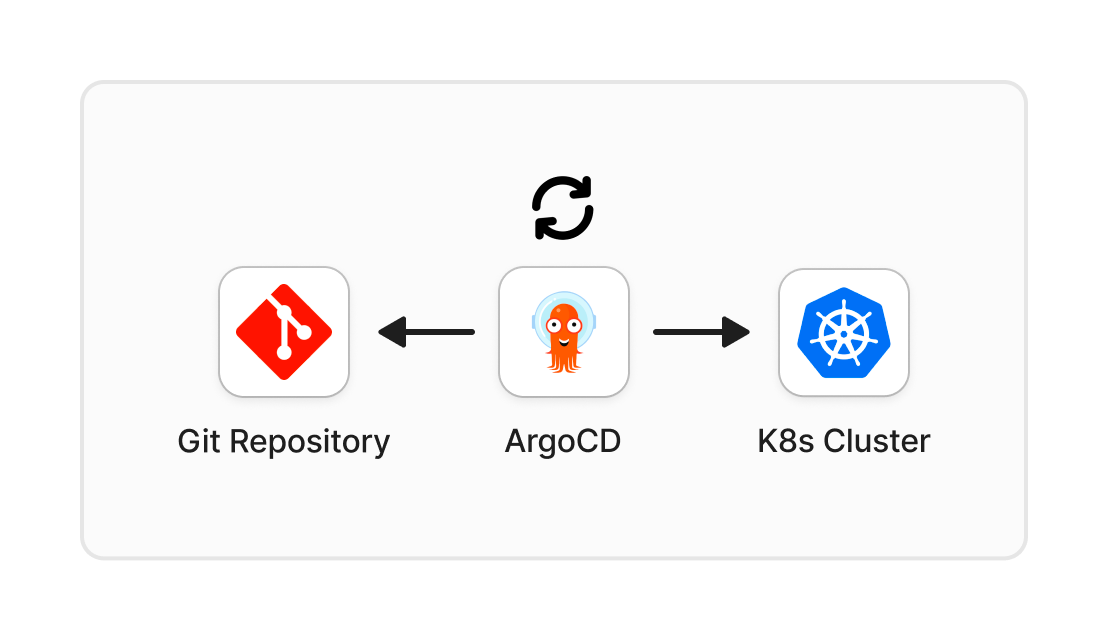
GitOps means Git is the source of truth for both app and infra state. You declare the desired state in a repository, then a controller like ArgoCD keeps the cluster aligned with that state.
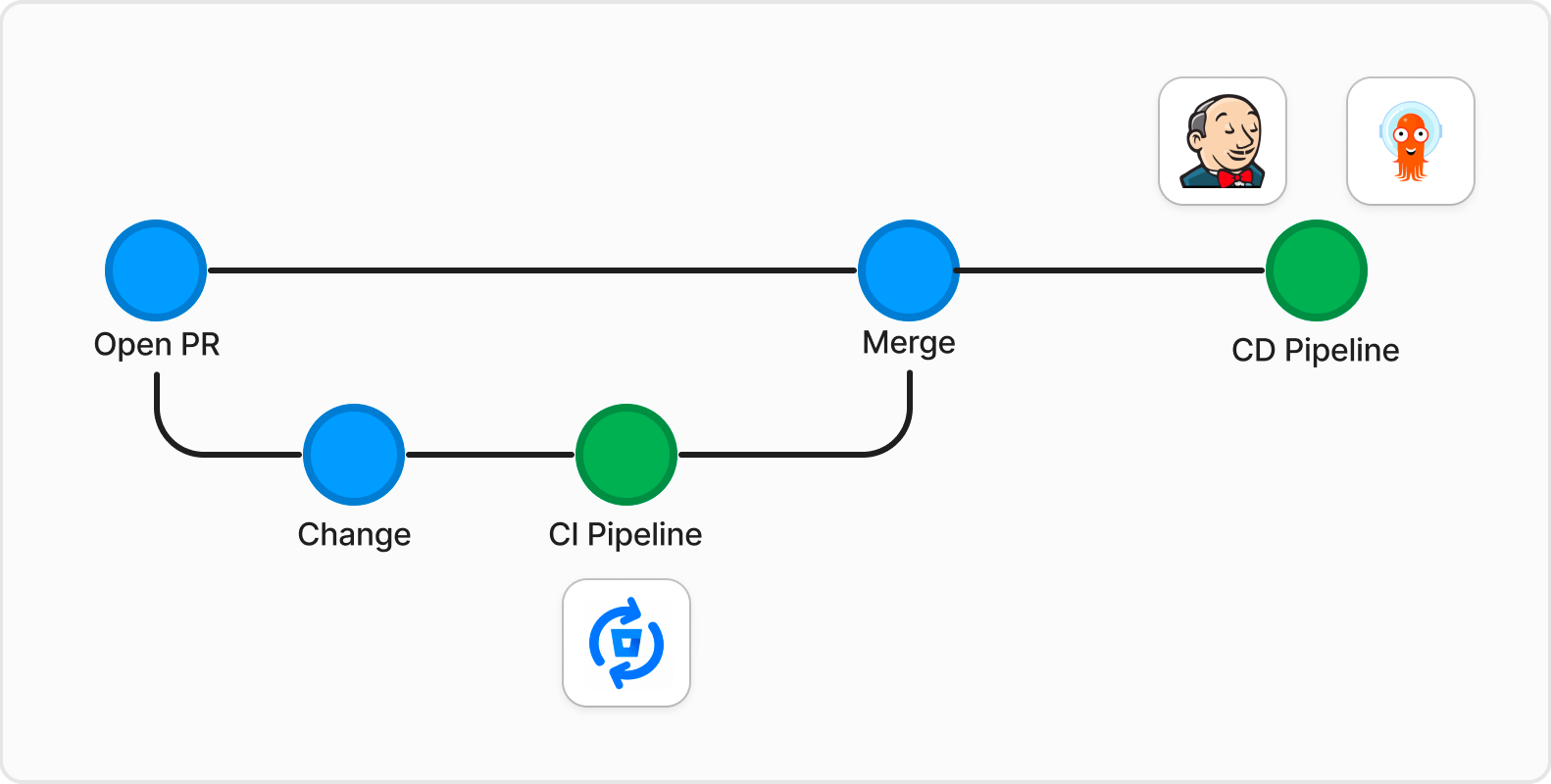
Key concepts#
- Declarative config: manifests define what should exist.
- Versioned changes: every infrastructure or app config change is tracked in Git.
- Automatic sync: controllers detect drift and apply desired state.
- Reconciliation loop: desired state and live state keep converging.
Push vs pull#
Most teams use one of two strategies: push or pull.
Push strategy#
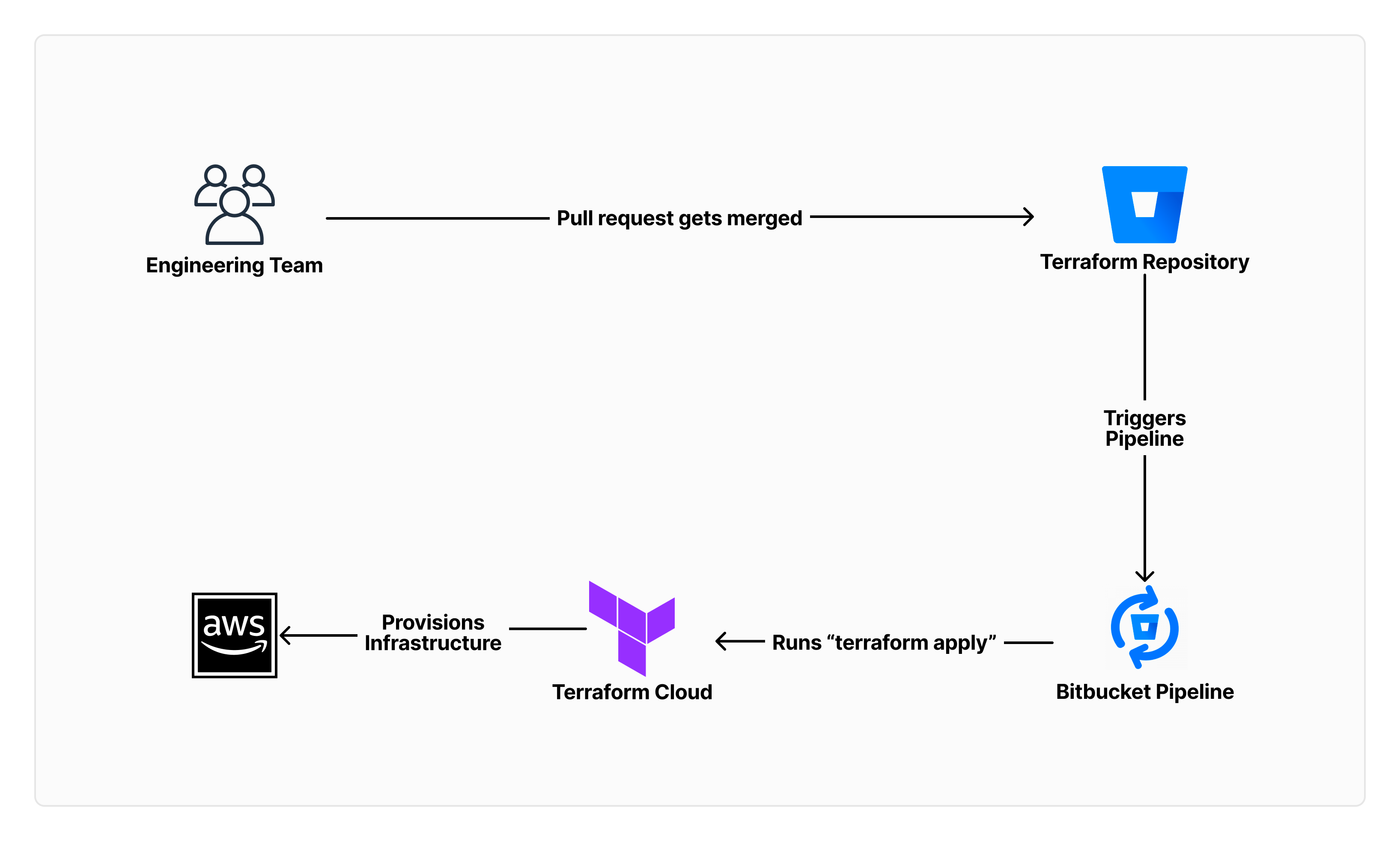
- A pipeline pushes changes to the target environment.
- You control exactly when apply happens.
- Common example: Terraform apply in CI.
Pull strategy#
- The target environment continuously pulls desired state from Git.
- Drift is corrected automatically through reconciliation.
- Common example: ArgoCD watching Kubernetes manifests.
Comparison#
| Push Strategy | Pull Strategy |
|---|---|
| Fine-grained control over when changes are applied | Changes are applied periodically, unless webhooks are configured |
| Simple to implement and understand | Slightly more complex architecture |
| Immediate feedback on the success or failure of the changes | Feedback is given when changes are periodically applied, with automatic rollback when failed |
| Desired and actual state can drift | Desired and actual state stay aligned through reconciliation |
ArgoCD#
- ArgoCD is a GitOps CD tool for Kubernetes.
- It gives you both a UI and CLI to inspect sync state, deploy, and roll back.
- It works well with Helm and Kustomize.
- State is persisted in etcd. Redis is cache only, so it can be rebuilt. More details here.
- In pull mode, ArgoCD polls Git, compares desired state with cluster state, and syncs when needed.
Here is how it works:
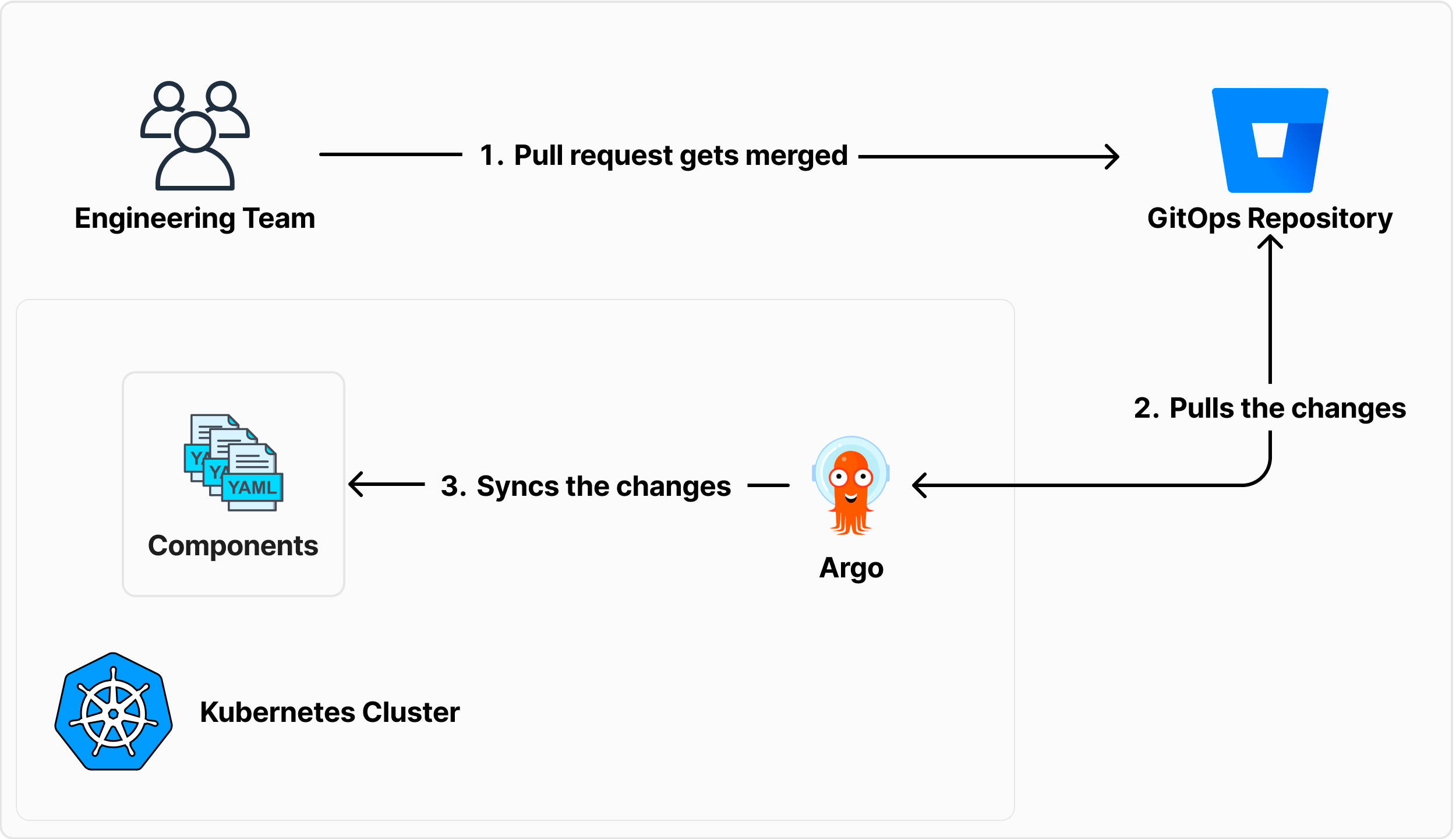
ArgoCD uses Application and ApplicationSet resources to keep deployments declarative. Here is a basic example. Official docs are here.
Install ArgoCD helm chart#
Using Helm CLI#
helm repo add argo https://argoproj.github.io/argo-helm
helm install argocd argo/argo-cd
Using Terraform#
resource "helm_release" "argocd" {
  name = "argocd"

  repository       = "https://argoproj.github.io/argo-helm"
  chart            = "argo-cd"
  version          = ""
  namespace        = "argocd"
  create_namespace = true
}
Create an ArgoCD application#
You can also apply this with kubectl or the Terraform kubernetes_manifest resource.
apiVersion: argoproj.io/v1alpha1
kind: Application
metadata:
  name: guestbook
  namespace: argocd
spec:
  project: default
  source:
    repoURL: https://github.com/argoproj/argocd-example-apps.git
    targetRevision: HEAD
    path: guestbook
  destination:
    server: https://kubernetes.default.svc
    namespace: guestbook
  syncPolicy:
    automated:
      prune: true
      selfHeal: true
      allowEmpty: false
    syncOptions:
      - Validate=true
      - CreateNamespace=true
      - PrunePropagationPolicy=foreground
      - PruneLast=true
This setup deploys the ArgoCD example app from a specific repository path and target revision. If the repo is private, configure credentials with a secret. A sample is available here.
You can reference that secret with:
"argocd-image-updater.argoproj.io/write-back-method" = "git:secret:argocd/${local.repo_secret_name}"The sync options add guardrails and make behavior explicit:
-
Automated sync:
prune: removes resources no longer defined in Git.selfHeal: reverts manual cluster changes to match desired state.allowEmpty: blocks sync if the source is empty.
-
Sync options:
Validate=true: validates manifests before applying.PrunePropagationPolicy=foreground: runs pruning in the foreground.CreateNamespace=true: creates the namespace if it does not exist.PruneLast=true: prunes resources last during sync.
GitOps workflow with ArgoCD#
- Configuration in Git: teams commit desired app and infra state.
- Synchronization: ArgoCD reconciles that state into the cluster.
- Rollback and history: deployment history stays available for audit and recovery.
Argo Image Updater#
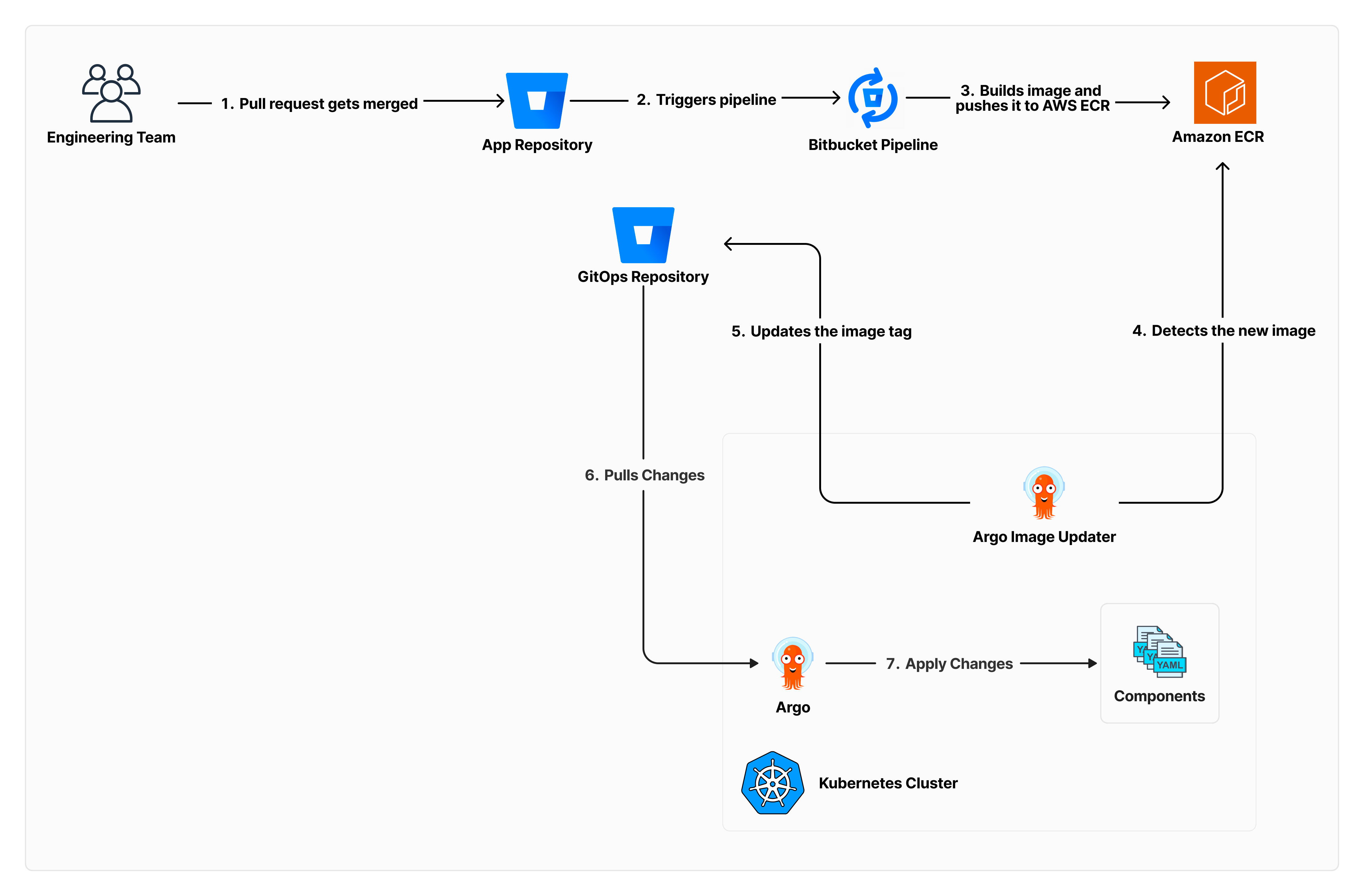
Argo Image Updater updates image tags in GitOps manifests automatically. This helps keep environments fresh without hand-editing tags.
Install Argo Image Updater helm chart#
Using Helm CLI#
helm repo add argo https://argoproj.github.io/argo-helm
helm install argocd-image-updater argo/argocd-image-updater -f values.yaml
Using Terraform#
resource "helm_release" "argo_image_updater" {
  name = "argo-image-updater"

  repository       = "https://argoproj.github.io/argo-helm"
  chart            = "argocd-image-updater"
  namespace        = "argocd"
  create_namespace = true
  version          = ""

  values = [templatefile(
    "${path.module}/resources/values.yaml",
    {
      AWS_REGION           = var.aws_region
      AWS_ACCOUNT_ID       = var.aws_account_id
      IAM_ROLE_NAME        = aws_iam_role.argo_image_updater_role.name
      BITBUCKET_PUSH_EMAIL = var.bitbucket_push_email
    }
  )]
}
Image updater values file#
This example uses AWS ECR as the image registry. Replace the registry configuration for your setup.
metrics:
  enabled: true

config:
  registries:
    - name: ECR
      api_url: https://${AWS_ACCOUNT_ID}.dkr.ecr.${AWS_REGION}.amazonaws.com
      prefix: ${AWS_ACCOUNT_ID}.dkr.ecr.${AWS_REGION}.amazonaws.com
      default: true
      ping: yes
      insecure: no
      credentials: ext:/scripts/ecr-login.sh
      credsexpire: 11h

  # Email used to commit image updates to the GitOps repository
  gitCommitMail: ${BITBUCKET_PUSH_EMAIL}

authScripts:
  enabled: true
  scripts:
    ecr-login.sh: |
      #!/bin/sh
      aws ecr --region $AWS_REGION get-authorization-token --output text \
        --query 'authorizationData[].authorizationToken' | base64 -d

extraEnv:
  - name: AWS_REGION
    value: ${AWS_REGION}

serviceAccount:
  create: true
  annotations:
    eks.amazonaws.com/role-arn: arn:aws:iam::${AWS_ACCOUNT_ID}:role/${IAM_ROLE_NAME}
These annotations tell Argo Image Updater which image and Helm value to update. Add them to the ArgoCD Application resource.
apiVersion: argoproj.io/v1alpha1
kind: Application
metadata:
  name: guestbook
  namespace: argocd
  annotations:
    "argocd-image-updater.argoproj.io/image-list": "=${var.aws_account_id}.dkr.ecr.${var.aws_region}.amazonaws.com/"
    "argocd-image-updater.argoproj.io/admin-api.helm.image-tag": ".image.tag"
spec: ...
Image update policies#
- In an
Applicationmanifest, annotations define image update policy with regex rules like<image>.allow-tags. Full list here. - This lets you control which tags are valid per environment. For example, development can accept only snapshot tags:
argocd-image-updater.argoproj.io/.allow-tags: "regexp:2\.\d+\.\d+-SNAPSHOT"I recommend making these rules explicit early. It avoids accidental promotion of the wrong tag class.
Summary#
GitOps with ArgoCD gives you a cleaner operating model for Kubernetes. Desired state stays in Git, reconciliation handles drift, and rollbacks are straightforward.
When you add Argo Image Updater, image promotion also becomes policy-driven instead of manual. Less operational noise, more predictable deploys.